Dragon NaturallySpeaking Home 11 with Headset
Create documents and email, surf the Web, and more - All By Voice
Product Information
Dragon NaturallySpeaking Home Version 11 speech recognition software lets you interact with your PC just by talking! It understands what you say and how you say it. Speak words and they appear on the screen - three times faster than typing. Tell your PC what to do and it does it. Use your favorite applications to create documents and email, surf the Web, update Facebook, and more. Dragon Home is so fast, easy and fun; you?ll wonder how you managed without it!
New Features
More Intuitive User Interface
New Dragon Sidebar of commands makes it easier to discover and access important but often overlooked features, commands, and options.
Recognition Analytics alerts you when there is an audio issue so you can achieve the best accuracy.
Elimination of on-screen distractions enables you to focus more on your thoughts and ideas for better communication.
Improved Accuracy
15% greater accuracy out of the box compared to Dragon 10
Enhanced correction enables you to make multiple selections, edits or formatting changes at one time for improved productivity and time savings.
Improved ability to learn from corrections of misrecognitions ? whether the revisions are dictated or typed ? to deliver continuous accuracy improvements over time.
Faster Performance
Improves recognition response time; faster than previous editions when selecting application menu items by voice; faster when executing voice commands that perform actions within applications (e.g., "insert page break," "make that red," etc.)
More Dragon Voice Shortcuts are included to consolidate multiple mouse clicks and keystrokes into a single voice command, like ?Search [site] for [XYZ]?.
New desktop and document navigation commands let users switch effortlessly between open windows by just saying the number of the selected window. Other commands make it simpler than ever to launch popular Windows programs on demand.
Key Benefits
Turn Talk into Text
Say words and watch them appear on your computer screen in Word, Excel, PowerPoint, Outlook, and more - three times faster than typing with up to 99% recognition accuracy right out of the box.
Unlock Your Creativity
Transform ideas into text at the speed of thought. Don't let typing, spelling, or fear of the blank page slow you down. Convert your thoughts into words just by talking. It's that simple.
Use Your Favorite Applications
Use your voice to dictate and edit documents. Control applications like OpenOffice Writer, Microsoft Word, Microsoft Outlook, Internet Explorer, and more.
Multi-task Like Never Before
Dragon Voice Shortcuts make it faster and easier than ever to create email, schedule appointments, and search the Web or your desktop for specific information or resources at anytime. Just say commands like "Search the computer for hanger steak recipe" or "Search maps for Uninon College Schenectad, New York" and Dragon returns the results in a Web browser. Need to send an email to friends? Just say, "send email to John Smith and Raphael Sanchez." Dragon automatically opens Microsoft Outlook, creates a new email, enters the email addresses, and sends the message.
Sit Back, Relax, and Get More Done
Control your PC, desktop, and application in a comfortable, hands-free mode. Use your voice for a natural, enjoyable computer experience and say goodbye to pain and repetitive stress injuries.
Experience New Freedom
Working on your PC doesn't have to be a drag. Break free and experience new levels of creativity, control, and comfort with Dragon Home.
Have Fun at Your PC
Dragon is easy to install and fun to use. It changes the way you interact with your computer for the better so you can get more done faster and get on with your life.
Product Highlights
Stop Typing, Start Talking
Because typing is slow, sometimes it?s hard for the keyboard to keep up with your brain. With Dragon Home, you can say words and watch them appear on your computer screen in OpenOffice Writer, Microsoft Word, Microsoft Outlook, Internet Explorer, and more.?
Speak Commands and Your Computer Obeys
Just tell your computer what you want to do, such as "Delete line," "Copy that," "Make that red," or "Open Microsoft Word," and Dragon will complete the task. The Dragon Sidebar lets you see helpful voice commands and tips at anytime without interrupting what you?re doing.
Enjoy a Personalized Experience
Dragon Home recognizes how you talk and what you say. It learns your voice better over time?even if you have an accent. You can personalize Dragon with your own words and formatting preferences tailored to what you do and how you do it.
Works with Most Windows Applications
Create documents, manage your email, or surf the Web?all by voice. Dragon Home allows you to enter text and control the application menus for nearly any Windows-based application
Product Features
Up to 99% speech recognition accuracy right out of the box
Creation of documents, reports, or messages just by speaking
Nuance Text-to-Speech technology that reads on-screen text in human-sounding synthesized speech
Dragon Voice Shortcuts that let you create email, schedule appointments, and search the Web or your desktop using simple voice commands
Support for Microsoft Word, Open Office Writer, Microsoft Outlook, Internet Explorer, Firefox
Includes
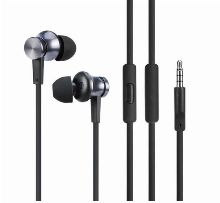
Stereo Communication Headset (HS-GN-B)
The headset has an adjustable headband to ensure the best fit, which can be adjusted up or down.? The microphone boom can be swiveled up to 270 degrees, and users can choose to place the microphone on either the left or right side depending on the individual's preference.? Adjust microphone boom to be on the same level or height as the user's mouth.? The bendable microphone boom allows user to set the distance between the mouth to the microphone piece.
Windows Requirements
System Requirements
The install process checks that your system meets the minimum requirements; if they are not met, Dragon NaturallySpeaking will not be installed.
CPU: minimum 1 GHz Intel Pentium or equivalent AMD processor or 1.66 GHz Intel Atom processor. We recommend 1.8 GHz Intel Dual Core or equivalent AMD processor. (IMPORTANT: SSE2 instruction set required)
Processor Cache: minimum 512 KB. 2 MB recommended
Free hard disk space: 2.5 GB (2.8 GB for localized non-English versions)
Supported Operating Systems:
Windows 7, 32-bit and 64-bit
Windows Vista SP1 and SP2, 32-bit and 64-bit
Windows XP SP2 and SP3, 32-bit only
Windows Server 2003 and 2008, SP1, SP2 and R2, 32-bit and 64-bit
RAM: minimum 1 GB for Windows XP and Windows Vista, and 2 GB for Windows 7 and Windows Server 2003/2008. 2 GB RAM recommended for Windows XP/Vista and 4 GB for Windows 7 and Windows Server 2003/2008 64-bit
Microsoft Internet Explorer 6 or higher (free download at www.microsoft.com)
Creative Labs Sound Blaster 16 or equivalent sound card supporting 16-bit recording
DVD-ROM drive required for installation
Nuance-approved noise-canceling headset microphone (included in purchase). See details at support.nuance.com/compatibility/(includes Bluetooth microphones, recorders, and Tablet PCs).
Note: An Internet connection is required for product activation (a quick anonymous process).
* This edition of Dragon does not support dictation directly into Electronic Medical Record (EMR) Systems. For EMR support, please use Dragon Medical Edition.
Due to the type of product packaging, once this product has been opened it is non-returnable. If the product is defective, it will be exchanged for the same product. No cash refunds.
74.99
USD
InStock